50 Funny and Clever Wi-Fi SSID Network Names

Let’s face it - manufacturer assigned WiFi Wireless Router network names are simply boring. Every time you need to connect one of your devices, you probably see a long list of names like Belkin04621, Linksys1019014, netgear, linksys etc. But it doesn’t have to be that way! Show your neighbors you have some personality by updating your router’s name to something utterly awesome and watch the party invitations roll in. Think of a funny or clever name when setting up your Wi-Fi router. What is the best wifi names you can come up with?
Be sure to read our article Ten Ways to Fix Wireless Router Problems
Changing your Wi-Fi Router's name
So how do you change your router’s name? First, don’t panic - it’s not complicated and you don’t need to call in the Geek Squad. Second, find your router’s web address on the bottom of your router or from its manual. It’s generally 192.168.1.1 (or 192.168.0.1, 192.168.2.1.), but could be something else entirely. Just enter the numbers into your browser: http://192.168.1.1
and *presto*, you’re connected to your router and will be prompted to enter your password and username. The default username and password are also in your wifi router's manual or on the bottom of the device. Login, then find the field to change your network name, Wireless Network Name, or SSID. Save the changes. Simple.
After changing the name, you will probably have to reconnected your WiFi devices to the unit.
Find the Best Price on a better Wireless Router
Smartphone Deals
-
 Posted by:
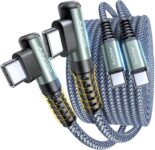
AINOPE USB C to USB C Cable (60W 2Pack 6.6ft) C to C Cable Fast Charging Right Angle $4.99 + Free Shipping
($8.99)Price drop. Amazon has a AINOPE USB C to USB C Cable (60W 2Pack 6.6ft) C to C Cable Fast Charging Right Angle, $4.99 after Coupon Code: 658Q94W5 - Free Shipping $35 or with Prime. Expires: 10/25/2026 - Highly Rated at 4.5 out of 5 stars. Next lowest price $9
- Tired of charging cables breaking at the joints? Compared to conventional electronic smartphone USB C to USB C cable, this type c chargers fast charging cable features an ergonomic 90° Right Angle end "L" design that may successfully prevent typical wear, straining cable and connection issues and increase the longevity life of the usb c to c cable fast charging for Samsung. Its ergonomic design makes it easier and more comfortable without blocking your hand to play games, use apps in portrait mode, watch videos, and read e-books while charging. Besides, it can be used in any cramped corner, making it the perfect companion for couch sessions or car mounts.
- 400,000+ BENDING TEST & MILITARY GRADE: While others offer 10,000-bend durability, AINOPE sets a new standard with a 400,000+ bending lifespan. Reinforced 90 degree end military-grade nylon braided iPhone 17 pro max charging cable fast charger usb c with special SR joint, Lasts 30x longer than ordinary cables-proven in a laboratory environment to withstand 400,000 bends. It built-in laser welding technology, which ensure the metal part won't break. One of the toughest c type charger fast charging type c cord ever created, with tensile strength capable of withstanding 175 lbs. It's built to outlast your device, effectively ending the cycle of frequent cable replacements.
- 60W BLAST FAST CHARGING, SAVING MORE TIME: This type c to type c cable fast charging support PD3.0/QC4.0/PPS2.0 fast charging up to 60W Max (20V/3A) with Type C Port Power Delivery adapters such as 30W/45W/60W. which 2.2X faster than 3.1A version and charges USB C fast charger cable cord Phone from 0% to 88% within 35 minutes, iPad Pro 64% within 35 minutes, Macbook air 50% within 35 minutes, and data transfer speeds up to 480Mbps (1200 songs synced/minute) compatible with iPhone 17 16 15 Series Samsung Galaxy S25 tablet iPad pro Air Mini Macbook Air etc. The internal smart chip ensures stable current and prevents overheating for safe, rapid charging.
Sales tax in: All Except AK, DE, MT, NH, OR
Posted: October 22, 2026 11:59 PM PDT
MoreLess


-
 Posted by:
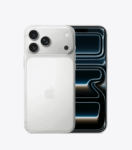
Up to $1200 off iPhone 18 Pro, 18 Pro Max - AT&T, Verizon, T-Mobile
Time to switch to a better carrier with a new iPhone 18 Pro. Up to $1200 off iPhone 18 Pro, 18 Pro Max - AT&T, Verizon, T-Mobile when you activate service and trade in select phones. Deals are way better than expected, time to upgrade and switch carriers. If you have anything older than an iPhone 11, it is time to upgrade. Shipping soon.
How to Switch from AT&T to T-Mobile
- iPhone Pro 18 has 48Mpixel fusion Main camera with variable aperature, A20 Chip, bigger 6.3-inch display, Apple Intelligence, 5G, better battery, better camera, satellite emergency, crash detection and more!
Trade-in Old iPhone or Android Phone
The best deals are when trading in an old phone. If you do not have one, you can buy one of the older iPhone to get $1200 trade in value on AT&T! Keep your old iPhone as a spare. Buying a used iPhone is more worrisome with many having replaced screen using 3rd parties.
Wireless companies are giving phones away in exchange for locking you in for bill credits each month.
Unlock your credit report if you locked it to pass credit checks.
Special iPhone 18 Promotions when you Switch
- AT&T - Get the new iPhone 18 Pro for $0 with eligible iPhone Trade in when you purchase on an installment plan, with an eligible AT&T unlimited plan (speed restrictions apply)
- Verizon: Get new iPhone 18 Pro no activation or upgrade fees. Get one every year. $80/month
- T-Mobile: Get an iPhone 18 Pro ON US via 36 mo. bill credits when you trade in an eligible device on Experience Beyond Plan
Some Older phones are available with less trade in. Trading in is a lot easier than selling your phone on eBay or Craigslist.
New iPhones 18:
- iPhone 18 Pro: Starts at $1199 (256GB), $1,399 (512GB), $1799 (1TB)
- iPhone 18 Pro Max: Starts at $1,299 (256GB), $1,499 (512GB), $1899 (1TB), $2499 (2TB)
The biggest changes: USB-C port (no more proprietary Lightning cables!), all models have top of the screen Dynamic Island, better low light cameras, and the iPhone 18 Pro/ Pro Max models now have the new and faster A18 chip that speed up all tasks.
AT&T Premium 2.0 Plan
- 1 Line $65.99/mon for Unlimited Talk, Text, Web, standard definition Streaming, Max 3Mbps data speed, 5GB Hotspot
- 4 lines $50/mo per line
- Unlimited Talk, Text & Data
- AT&T Active Armor Security
- 100GB hotspot per line
- Standard Streaming
- 5G Access
- Plus tax & fees
AT&T Trade-In Promotion
- Apple: iPhone 18 Pro or 18 Pro Max up to $1,200 max bill credit (Over 36 months) when trading in a smartphone valued at or above $180 after condition assessment.
- Eligible devices: (Price on ebay)
-
Apple iPhone: 14, 14 Plus, 14 Pro, 14 Pro Max, 15, 15 Plus, 15 Pro, 15 Pro Max, 16, 16 Plus, 16 Pro, 16 Pro Max, 16e
-
Samsung Galaxy: S23 Ultra, S24+, S24 Ultra, Z Fold5, Z Flip6, Z Fold6, Z Flip7 FE, Z Flip7, Z Fold7, S25, S25 FE, S25+, S25 Edge, S25 Ultra, S26, S26+, S26 Ultra
-
Google Pixel: 9, 9 Pro, 9 Pro XL, 9 Pro Fold, 10, 10a, 10 Pro, 10 Pro XL, 10 Pro Fold
-
Posted: October 22, 2026 3:27 PM PDT
MoreLess
-
 Posted by:
Jackery Portable Power Station Explorer 300, 293Wh Backup Lithium Battery Sale $259.99 + Free Shipping
($289.00)Price drop. Amazon has a Jackery Portable Power Station Explorer 300, 293Wh Backup Lithium Battery Sale, $259.99, after discount at checkout, Free Shipping. Expires: 10/29/2026 - Highly Rated at 4.6 out of 5 stars with lots of reviews. Next lowest price $260+. 6k+ bought in past month.
Camping, emergencies, and more..
Lesser needs:
Jackery Explorer 240D Power Bank, 256Wh $189 Free Shipping ($219)
- This entry-level portable power station is equipped with a 293Wh lithium-ion battery pack, weighing only at 7.1 pounds. The solid handle makes it easy to carry around for outdoor adventures such as Tent Camping, Road Trip, Backyard Camping, etc.
- 1* Pure Sine Wave AC outlet (110V 200W 400W Peak), 2* USB-A ports (5V, 2.4A), and 1* 12V DC car port to charge your road trip essentials such as smartphones, laptops, cameras, fans, lights and so on. Pass-through charging is supported.
A portable power station is useful because it provides reliable backup power for charging devices, running small appliances, or powering tools during outages, camping, or travel. It’s a clean, quiet alternative to gas generators, often with multiple ports including AC, USB, and DC.
Sales tax in: All Except AK, DE, MT, NH, OR
Posted: October 21, 2026 11:59 PM PDT
MoreLess
-
 Posted by:
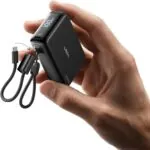
LISEN Small Portable Charger, 45W 10,000mAh Mini Power Bank Fast Charging Sale $22.99 + Free Shipping
($40.00)Price drop. Amazon has a LISEN Small Portable Charger, 45W 10,000mAh Mini Power Bank Fast Charging Sale, $22.99 after Coupon Code: NCNORFMK Free Shipping $35 or with Prime. Expires: 10/24/2026 - Highly Rated at 4.8 out of 5 stars.
- Small size. Big power | LISEN smallest power bank uses stacking tech and high-density cells to maximize internal space, achieving a credit card-sized body of just 3.2 × 2.2 × 1.0 in. It slips into your mini bag, slides into your jeans, and weighs only 7.2oz, yet packs 10,000mAh to keep you powered all day. From commute to getaway. Take it to work, the gym, a flight, a concert, or a park. Wherever you go, it goes right along, small enough to forget. Your life fits in your pocket without the bulk.
- Stays cool. 45W Fast | LISEN CoolCore advanced technology actively cools while charging and also protects battery health. In 30 min, the 45W PD Ultra mini portable charger charges iPhone 18 Duo to 75%, S26 Ultra to 92%, and iPad Pro (M5) to 55%. It outputs up to 45W via USB-C and up to 27W via USB-A, plus low-current to safely charge earbuds & watches, and recharges in 2h with the detachable cable. Note: 15W shared output on dual ports — designed for device safety and stable power delivery.
- Two cords. Two jobs | Not one, but two — detachable fast‑charge cable + carry lanyard. Unlike single-strap, no tugging, no cable damage. One charges at full speed, the other holds securely, so your hands stay free to scroll, snap, or sip your coffee. Made with 48‑strand nylon braiding, it outlasts thousands of bends without fraying. Clip it to your bag, or pull out the tip and plug in instantly. No more digging for cables. Snaps back, bag tidy. No dangling or lost cable. Charge, Carry, Repeat.
Sales tax in: All Except AK, DE, MT, NH, OR
Posted: October 21, 2026 7:34 AM PDT
MoreLess
-
 Posted by:
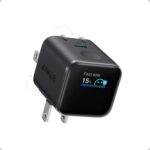
Expiring Today: Anker Smart Display Charger Nano USB C Block, 45W Sale $25.99 + Free Shipping
($40.00)Prime member Price drop. Amazon has a Anker Smart Display Charger Nano USB C Block, 45W Sale, $25.99 Free Shipping $35 or with Prime. Expires: 10/23/2026 - Highly Rated at 4.5 out of 5 stars. 10K+ bought in past month.
LED display with critical charge information
- Smart iPhone Recognition with Care Mode: Automatically recognizes supported iPhone models and adjusts charging for smarter, safer power delivery. Compatible only with iPhone 17 / 16 / 15 series, 11" iPad Pro (2024 / 2023 / 2021 / 2020), 12.9" iPad Pro (2022 / 2021 / 2020), and 13" iPad Pro (2024).Excluding iPhone 17e.
Posted: October 21, 2026 6:59 AM PDT
MoreLess
-
 Posted by:
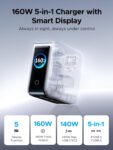
UGREEN Nexode Pro Charger, 160W GaN 5-Port Fast USB C Wall Charger Sale $59.99 + Free Shipping
($89.99)Price drop. Amazon has a UGREEN Nexode Pro Charger, 160W GaN 5-Port Fast USB C Wall Charger Sale, $59.99 Free Shipping. Expires: 10/24/2026 - Highly Rated at 4.7 out of 5 stars.
- 60W High Power PD Fast Charging Technology: Premium GaN laptop charger delivers total 160W overall output, C1 & C2 single port supports up to 140W max PD rapid charging, fully boost MacBook Pro 16 inch M4 Max to 56% battery within 30 minutes, ideal high wattage USB C fast charger for gaming laptops and large-screen notebooks
- 5-In-1 Multiport USB Charging Block: All-in-one charging station comes with 4 USB-C ports plus 1 USB-A port, enables simultaneous multi-device charging for MacBook, iPhone, Galaxy, AirPods and tablets, replaces multiple bulky wall chargers to organize your desktop clutter perfectly
- Smart Rotatable Touch Digital Display Design: Unique real-time monitor screen multiport charger features rotatable touch control panel, intuitively displays total output wattage, per-port power data, active charging protocol and internal temperature status, the fun animated emoticon adds extra user-friendly experience for daily use
Posted: October 19, 2026 6:16 AM PDT
MoreLess
-


Sure, you probably have some great ideas for your router’s new name. But just in case, we have scoured the Net and have come up with our top 50 fave wireless network names. Changing the name does not compromise your security and may in fact increase it. Here are some funny and clever SSID names:
- It Burns When IP
- I’m Under Your Bed
- Pretty Fly for a Wi-Fi
- FBI Surveillance Van #119871
- DEA Surveillance #4188A87
- I’m In Your Closet
- I’m Watching You Now
- Skynet Global Defense Network
- Let Me Out Of Your Router
- Undercover Police Car #751
- I’m Cheating on my WiFi
- InterTubes
- Mom - Click Here for Internet
- The Promised LAN
- Because a LANnister Never Forgets
- Occam’s Router
- New England Clam Router
- Keep it on the Download
- Please Click For Identity Theft
- Network Not Found
- Bill Clinternet
- I Can Haz Wireless?
- Drop it Like a Hotspot
- Router? I Hardly Knew Her
- Viruses Are Us
- NotTheDroidsYourLookingFor
- NoFreeInternetHereKeepLooking
- Call Me Maybe
- Hidden Network
- IP Freely
- No Internet Access
- NSA Net Secure
- Get Off My LAN
- The LAN Before Time
- Untrusted Network
- Virus Detected! Do Not Join
- Malware Repository
- Access Denied
- Uncle_Touchys_Game_Room
- C:\Virus.exe
- No Wi-Fi For You
- My Neighbors Suck!
- Abraham Linksys
- IP-UP
- YerBabyIsReallyUgly
- John Wilkes Bluetooth
- Slow WiFi
- Optimus Prime
- WamBamThankYouLan
- TellMyWiFiLoveHer
To make your WiFi Network name more secure you should also add "_nomap_optout" to the end of it. This prevents Windows 10 for sharing it and Google from indexing it.
When picking a name do not use your name, address, birthdate, kid's name, pet's name, or other personal information as part of the SSID. Do you have a vote for Best Wifi Names? Leave a comment below.



33 Comments
MrSkrimps
My SSID
WINTERNET is Coming…
Asquith Postlethwaite the Third, Esquire
Mine:
I’m Brian and so’s my wifi
Aubrey
A variation of #33 that I saw recently: HeyYouKidsGetOffMyLAN
RAMSKII
FREE WI-FI CONNECTION
Anas K A
Wife Eye
Kyle E
WuTang_Lan
jack
trump
Dan
I call mine “Hillary Clinternet”. Great for email servers…
IronSpam
Someone nearby me has “2_Girls_1_Router”
Aladin
I have double-SSID AP with “Ask Genie for password” and “Rub my Dick to summon a Genie”. There is actualy amazing origin story for this: When I set this up, I’ve had two hamsters, One called Dick, and second called Genie. Password was written on Genie’s hideout, and she (Genie) showed up only for food, or when her buddy Dick was touched.
The funny thing is, that no one ever wondered, why is there capital D in “Dick”. They found it just hilarious, and so am I. That’s why I still use theese SSIDs even five years after Dick and Genie are gone.
popai
“Recharge Your Mobile”
Munch Macoochie
Mine is “Rainbow Connection”
Hakan Söyek
My SSID:
o==[]:::::::::::::::::::::::::>
Mog
Here’s mine. |¤\/£ μ
Denise
A neighbor’s SSID is “Bill Wi the Science Fi”
Aakash Singh
LANnister’s Regards
Silence of the LAN
LAN of the House
gray
¯\_(ツ)_/¯
Burt
“martin router king”
Joe Mama
My phone picked up a network named “We can hear you banging” at a condo complex where the walls are really thin.
Jesse R
Love all these and now I need to change mine again, but in the meantime-
My current are:
HertzWhenIP
IPFreely (guest network)
Before that, I had (for all you Total Recall fans):
Kuato (inside network – get it?)
Quaid (the router name)
Freeloader (guest network)
Everyone always remembers my guest password too: pASSword123
Chris
©:X:X:X:{::;;;;;;;;;;;;;;;;;;:>
Or
O===[]:::::::::::::::::::::::>
Rob
Umbrella Corp – Guest networks (with background screen login)
The Hive – 2.4g
Hive – 5g
Danna Banana
Bite me
Unknown_error
Local PD Auxiliary
SurveilThis
Worldwide Pants
550 Permanent Failure
User
My SSID is “WIFI6G”
Amos fordjour
My SSID: ROOM NO ACCESS
PETER
My SSID : We are YAKUZA. You hack. We CHOP!
yenz
THATSWHATSHESSID
General fuzuki
Fleetwood MAC address
Prince Mèhráb Mãhmûd
My Wifi SSID : Connected Without Internet
Peter Carter
Wi Believe I Can Fi
Hridoy
My wifi ssid Covid_19
Sean49
sofa king we todd ed
Roy D Mercer
Bill Wi the Science Fi?